
Development overview
Understand the device software layers and choose a first task.
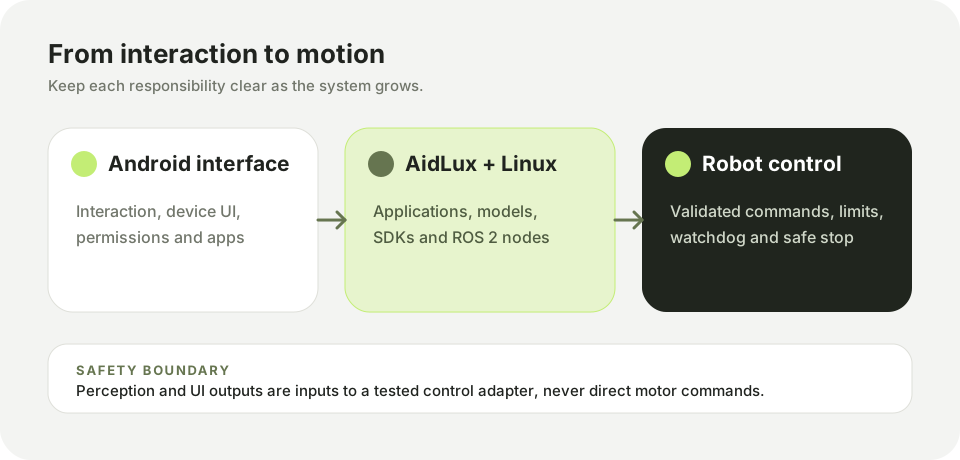
Duolix development spans three layers: a robot control stack, a Linux application environment, and the Android-facing AidLux system. Start with the layer that owns the task you want to perform. Keep actuator commands behind a tested control interface, and keep perception or UI experiments separate from motor enablement.
Choose a path
| Goal | Start with | Continue with |
|---|---|---|
| Open a terminal on the device | Quick start | Connect to the device |
| Identify the compute hardware | QCS6490 hardware overview | QCS6490 interfaces |
| Write an application | Development environment | AidLux workspace |
| Run an AI model | Inference workflow | AidLite SDK |
| Connect a robot application | ROS 2 integration | Your robot's validated control contract |
Before connecting hardware
Qmini uses a QCS6490 compute platform. Begin with the QCS6490 hardware overview, then confirm the carrier revision, power input, and connector pinout on your physical unit. These guides do not substitute for the electrical specification of the shipped assembly.
For a physical robot, complete a low-current bench check and an emergency-stop test before enabling any actuator. Run software examples with motor power disconnected until the control path has been verified.